
在后台自动执行重复性任务。Codex 会将发现的结果添加到收件箱,如果没有需要报告的内容,则自动归档任务。你可以将自动化功能与 技能 for more complex tasks.
对于项目范围的自动化,应用需要处于运行状态,且所选项目需要在磁盘上可用。
在 Git 仓库中,你可以选择自动化任务是在本地项目中运行,还是在一个新的 工作树。两种选项均在后台运行。工作树将自动化更改与未完成的本地工作隔离开来,而在本地项目中运行则可能会修改您仍在处理中的文件。在未进行版本控制的项目中,自动化将直接在项目目录中运行。
你还可以保留模型和推理努力(reasoning effort)的默认设置,或者在希望对自动化的运行方式进行更多控制时显式指定它们。
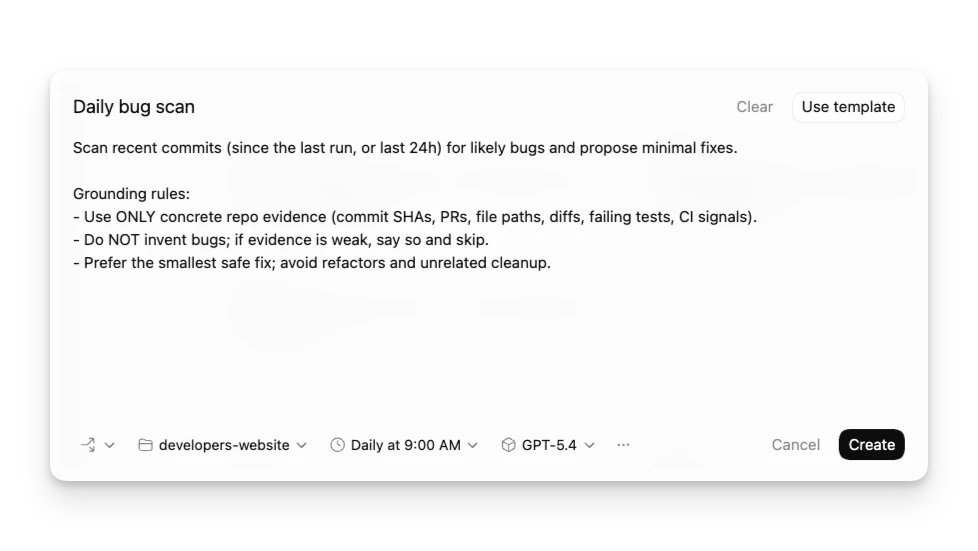
管理任务
在 Codex 应用侧边栏的自动化面板中查找所有自动化任务及其运行记录。
“Triage”部分相当于你的收件箱。带有发现结果的自动化运行会显示在这里,你可以筛选收件箱以显示所有自动化运行或仅显示未读运行。
独立自动化会按计划启动新的运行,并在“Triage”中报告结果。当每次运行需要相互独立,或者一个自动化任务需要在一个或多个项目中运行时,请使用此选项。如果你需要自定义执行频率,请选择自定义计划并输入 cron 语法。
对于 Git 仓库,每个自动化任务可以在你的本地项目中运行,也可以在一个专用的后台 工作树。当你希望将自动化更改与未完成的本地工作隔离时,请使用工作树。当你希望自动化直接在主检出目录中工作时,请使用本地模式,但请注意它可能会修改你正在编辑的文件。在未进行版本控制的项目中,自动化会直接在项目目录中运行。你可以让同一个自动化在多个项目上运行。
自动化使用你的默认沙箱设置。在只读模式下,如果工具调用需要修改文件、访问网络或操作计算机上的应用,则会失败。启用完全访问权限时,后台自动化任务会带来更高的风险。你可以在以下位置调整沙箱设置: 设置 并选择性地将命令添加到允许列表中: 规则.
自动化可以使用 Codex 可用的相同插件和技能。为了保持自动化的可维护性并能在团队间共享,请使用 技能
来定义操作并提供工具和上下文。你可以通过在自动化中使用 $skill-name 来显式触发技能,
让 Codex 创建或更新自动化
你可以在常规的 Codex 会话中创建和更新自动化。描述任务、计划,以及自动化是应保持附加在当前会话中,还是开启全新的运行。Codex 可以起草自动化提示,选择合适的自动化类型,并在范围或频率发生变化时对其进行更新。
例如,让 Codex 在部署完成时在这个会话中提醒你,或者让它创建一个独立的自动化,按重复计划检查项目。
技能也可以创建或更新自动化。例如,用于看护拉取请求的技能可以设置一个重复性自动化,该自动化使用 GitHub 插件检查 PR 状态,并修复新的审查反馈。
会话自动化
会话自动化是附加在当前会话上的心跳式重复唤醒调用。当你希望 Codex 按计划持续返回同一对话时,请使用它们。
当计划中的工作应保留会话的上下文,而不是每次都从新提示开始时,请使用会话自动化。
会话自动化可以使用基于分钟的间隔进行主动跟进循环,或者在需要在特定时间进行检查时使用每日和每周计划。
会话自动化适用于:
- 检查长时间运行的命令直到其完成
- 当结果应保留在同一会话中时,轮询 Slack、GitHub 或其他连接的来源
- 提醒 Codex 以固定频率继续审查循环
- 运行由技能驱动且使用插件的工作流,例如检查 PR 状态并处理新的反馈
- 使对话持续聚焦于正在进行的研究或分类任务
当每次运行需要相互独立、需要跨多个项目运行,或者结果应在“分类”中作为独立的自动化运行显示时,请使用独立或项目自动化。
创建线程自动化时,请确保提示词具有持久性。它应描述每次线程唤醒时 Codex 应执行的操作、如何判断是否有重要事项需要报告,以及何时应停止或向您请求输入。
测试自动化
在安排自动化之前,请先在常规线程中手动测试提示词。这有助于您确认:
- 提示词清晰且范围界定准确。
- 所选或默认的模型、推理能力和工具符合预期表现。
- 生成的差异内容可供审查。
当您开始安排运行时,请审查前几次的输出,并根据需要调整提示词或运行频率。
自动化的工作树清理
如果您为 Git 仓库选择使用工作树,频繁的调度可能会随着时间的推移创建许多工作树。请归档不再需要的自动化运行,除非您打算保留其工作树,否则避免固定运行记录。
权限与安全模型
自动化在无人值守的情况下运行,并使用您的默认沙箱设置。
- 如果您的沙箱模式为 只读, 如果工具调用需要修改文件、访问网络或操作计算机上的应用程序,则该调用将会失败。请考虑将沙盒设置更新为工作区写入。
- 如果您的沙箱模式为 工作区写入,如果工具调用需要修改工作区外的文件、访问网络或操作你计算机上的应用,则会失败。你可以使用以下方式有选择地将命令加入允许列表以在沙箱外运行: 规则.
- 如果您的沙箱模式为 完全访问,后台自动化操作风险较高,因为 Codex 可能在不询问的情况下更改文件、运行命令和访问网络。建议将沙箱设置更新为工作区可写,并使用 规则 以选择性地定义代理可以在完全访问权限下运行哪些命令。
如果您处于托管环境中,管理员可以使用管理员强制要求来限制这些行为。例如,他们可以禁止 approval_policy = "never" 或限制允许的沙箱模式。请参阅
管理员强制要求(requirements.toml).
自动化使用 approval_policy = "never" (在您的组织策略允许的情况下)。如果管理员要求禁止 approval_policy = "never",自动化操作会回退到你所选模式的审批行为。
示例
自动创建新技能
Scan all of the `~/.codex/sessions` files from the past day and if there have been any issues using particular skills, update the skills to be more helpful. Personal skills only, no repo skills.

If there’s anything we’ve been doing often and struggle with that we should save as a skill to speed up future work, let’s do it.

Definitely don't feel like you need to update any- only if there's a good reason!

Let me know if you make any.
随时了解项目的最新情况
Look at the latest remote origin/master or origin/main . Then produce an exec briefing for the last 24 hours of commits that touch <DIRECTORY>

Formatting + structure:

- Use rich Markdown (H1 workstream sections, italics for the subtitle, horizontal rules as needed).
- Preamble can read something like “Here’s the last 24h brief for <directory>:”
- Subtitle should read: “Narrative walkthrough with owners; grouped by workstream.”
- Group by workstream rather than listing each commit. Workstream titles should be H1.
- Write a short narrative per workstream that explains the changes in plain language.
- Use bullet points and bolding when it makes things more readable
- Feel free to make bullets per person, but bold their name

Content requirements:

- Include PR links inline (e.g., [#123](...)) without a “PRs:” label.
- Do NOT include commit hashes or a “Key commits” section.
- It’s fine if multiple PRs appear under one workstream, but avoid per‑commit bullet lists.

Scope rules:

- Only include changes within the current cwd (or main checkout equivalent)
- Only include the last 24h of commits.
- Use `gh` to fetch PR titles and descriptions if it helps.
  Also feel free to pull PR reviews and comments
结合自动化与技能来修复您自身的 Bug
创建一个新技能,尝试通过创建新的 $recent-code-bugfix and 来修复由您自己的提交引入的 Bug,将其存储在您的个人技能中.
---
name: recent-code-bugfix
description: Find and fix a bug introduced by the current author within the last week in the current working directory. Use when a user wants a proactive bugfix from their recent changes, when the prompt is empty, or when asked to triage/fix issues caused by their recent commits. Root cause must map directly to the author’s own changes.
---

# Recent Code Bugfix

## Overview

Find a bug introduced by the current author in the last week, implement a fix, and verify it when possible. Operate in the current working directory, assume the code is local, and ensure the root cause is tied directly to the author’s own edits.

## Workflow

### 1) Establish the recent-change scope

Use Git to identify the author and changed files from the last week.

- Determine the author from `git config user.name`/`user.email`. If unavailable, use the current user’s name from the environment or ask once.
- Use `git log --since=1.week --author=<author>` to list recent commits and files. Focus on files touched by those commits.
- If the user’s prompt is empty, proceed directly with this default scope.

### 2) Find a concrete failure tied to recent changes

Prioritize defects that are directly attributable to the author’s edits.

- Look for recent failures (tests, lint, runtime errors) if logs or CI outputs are available locally.
- If no failures are provided, run the smallest relevant verification (single test, file-level lint, or targeted repro) that touches the edited files.
- Confirm the root cause is directly connected to the author’s changes, not unrelated legacy issues. If only unrelated failures are found, stop and report that no qualifying bug was detected.

### 3) Implement the fix

Make a minimal fix that aligns with project conventions.

- Update only the files needed to resolve the issue.
- Avoid adding extra defensive checks or unrelated refactors.
- Keep changes consistent with local style and tests.

### 4) Verify

Attempt verification when possible.

- Prefer the smallest validation step (targeted test, focused lint, or direct repro command).
- If verification cannot be run, state what would be run and why it wasn’t executed.

### 5) Report

Summarize the root cause, the fix, and the verification performed. Make it explicit how the root cause ties to the author’s recent changes.
之后,创建一个新的自动化:
Check my commits from the last 24h and submit a $recent-code-bugfix.